To configure a repeating talking alarm on iPhone, choose an alarm time, select the days under Repeat and turn on Announce the Time. The current Talking Alarm Clock: Say Time listing also lets you add a label and icon and choose a voice language for that alarm.
Talking Alarm Clock: Say Time is an iPhone and iPad alarm app that says the current hour and minute aloud. Its repeat controls are intended for alarms that should run on selected days of the week.
Which settings are shown when I add an alarm?
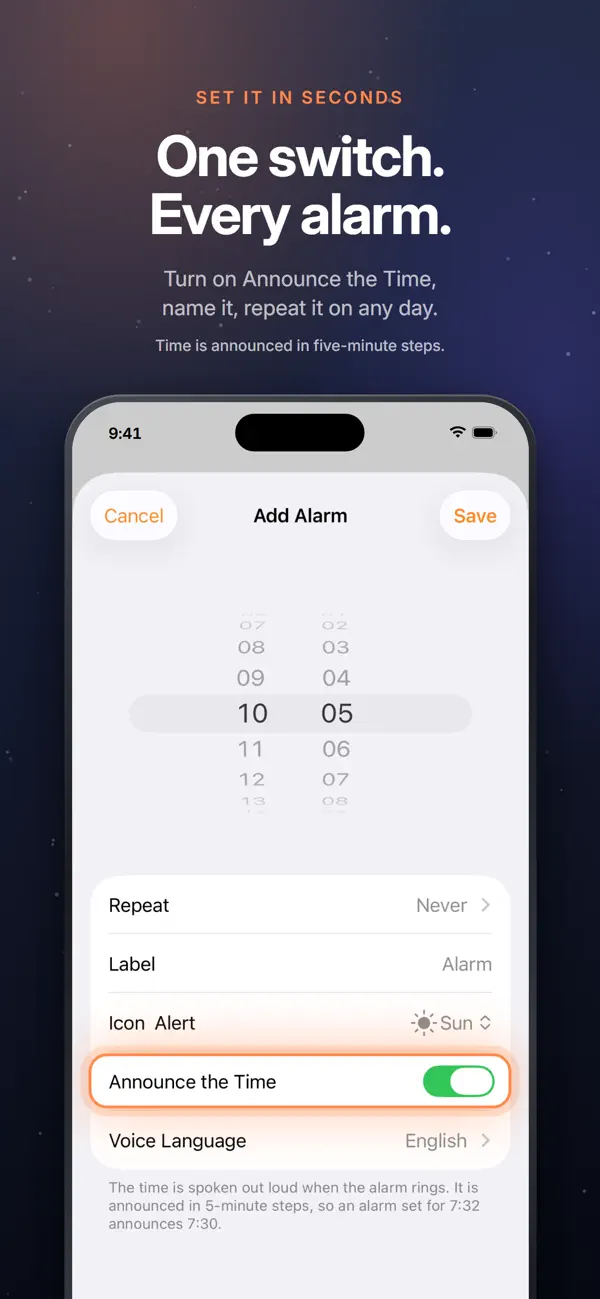
The current official App Store screenshot shows these controls on the Add Alarm screen:
- Time: choose when the alarm is scheduled.
- Repeat: select the days on which the alarm should repeat.
- Label: give the alarm a name.
- Icon Alert: choose an icon for the alarm.
- Announce the Time: turn the spoken-time behavior on or off.
- Voice Language: choose the voice language for this alarm.
Can different alarms repeat on different days?
Yes. The App Store description says an alarm can repeat on any days of the week. Because repeat is part of each alarm's setup screen, you can configure the schedule for the alarm you are creating.
The listing does not describe a preset weekday or weekend template, so this article does not assume one. Use the visible Repeat control to select the days you need.
Can I choose a separate spoken language for the alarm?
Yes. Voice Language appears on the Add Alarm screen, and the current listing says you choose the voice language for each alarm.
For a dedicated language guide, read How Do I Choose a Different Voice Language for Each iPhone Alarm?.
What should I know before using a repeating alarm?
The current listing says spoken times use five-minute steps. The current US App Store listing also requires iOS 26.0 or later.
Frequently asked questions
Can a Talking Alarm Clock alarm repeat on selected weekdays?
Yes. The current App Store description says an alarm can repeat on any days of the week.
Where do I turn on the spoken-time announcement?
The official Add Alarm screenshot shows an Announce the Time switch in the alarm settings.
Can I name a repeating alarm?
Yes. The current listing and screenshot show a Label field for naming an alarm.
Can each repeating alarm use its own voice language?
Yes. The current listing says the voice language is selected for each alarm.
Where can I check the current alarm controls?
You can view Talking Alarm Clock: Say Time on the App Store for the latest description, official screenshots and compatibility information.