Yes. Talking Alarm Clock: Say Time describes a custom alarm that combines a countdown, a schedule and snooze. The App Store lists this alongside ordinary alarms and quick timers. It does not describe every custom-alarm setting or the exact order of taps, so check the current app screen for those details.
Talking Alarm Clock: Say Time is a clock app for iPhone and iPad that can announce the current hour and minute when an alarm rings. Its custom-alarm option is for someone who wants the three listed timing elements in one alarm.
What does the App Store say a custom alarm includes?
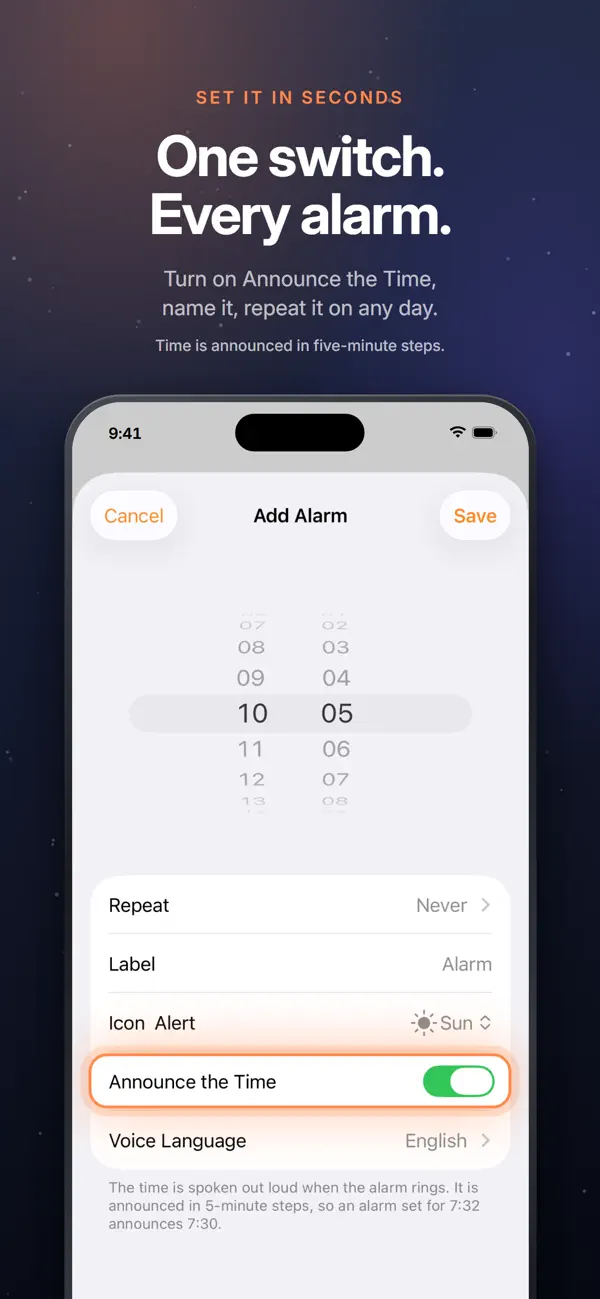
The current description names three elements: a countdown, a schedule and snooze. It separately describes a standard alarm, which can repeat on selected days and have a name and icon, and quick countdown timers for tasks such as cooking or laundry. The listing does not give a step-by-step custom-alarm setup guide, so this article does not assume that its controls match the standard Add Alarm screen.
How is this different from a quick timer?
A quick timer is presented as a countdown for a task. The custom alarm is the option the listing explicitly describes as combining a countdown with a schedule and snooze. If you only need a countdown, see the separate timer guide.
What should I check before setting it up?
The US App Store listing presents the app for iPhone and iPad and requires iOS or iPadOS 26.0 or later. It says spoken times are announced in five-minute steps; it does not promise exact-minute speech for a custom alarm. For the latest controls, view Talking Alarm Clock: Say Time on the App Store.
Frequently asked questions
Can a custom alarm include a countdown?
Yes. The current App Store description says a custom alarm combines a countdown, a schedule and snooze.
Does the app also have ordinary alarms?
Yes. Ordinary alarms are listed separately and can repeat on selected days, with a name and icon.
Is a custom alarm the same as a quick timer?
No. The listing describes quick timers as countdowns and custom alarms as a combination of countdown, schedule and snooze.
Will a custom alarm speak the exact minute?
The listing does not make that promise. It says alarm time announcements use five-minute steps.
Where can I check current compatibility?
The US App Store listing gives the current device and system requirements; it presently lists iPhone and iPad with iOS or iPadOS 26.0 or later.